One grocery list from your recipes, sorted by aisle.
Add a recipe, or a whole week of them, and Platefolio makes one grocery list: the same ingredient combined across recipes, sorted by aisle, and scaled to the servings you're making. It's free on every plan, works in a store with no signal, and on Head Chef your whole household can share it.
A grocery list maker that starts from your recipes
No typing out what a recipe already says. Platefolio reads the ingredients from the recipes you've saved and puts them on your list for you, leaving off the pantry staples you always have on hand.
- One recipe. Add it from the recipe's page. Every ingredient starts checked except your pantry staples, so you only uncheck what you already have.
- A whole week. Plan your meals on the meal planner, then add the rest of the week to the list in one go.
- Anything else. Type in paper towels or 2 lemons, and they're sorted in with the rest.
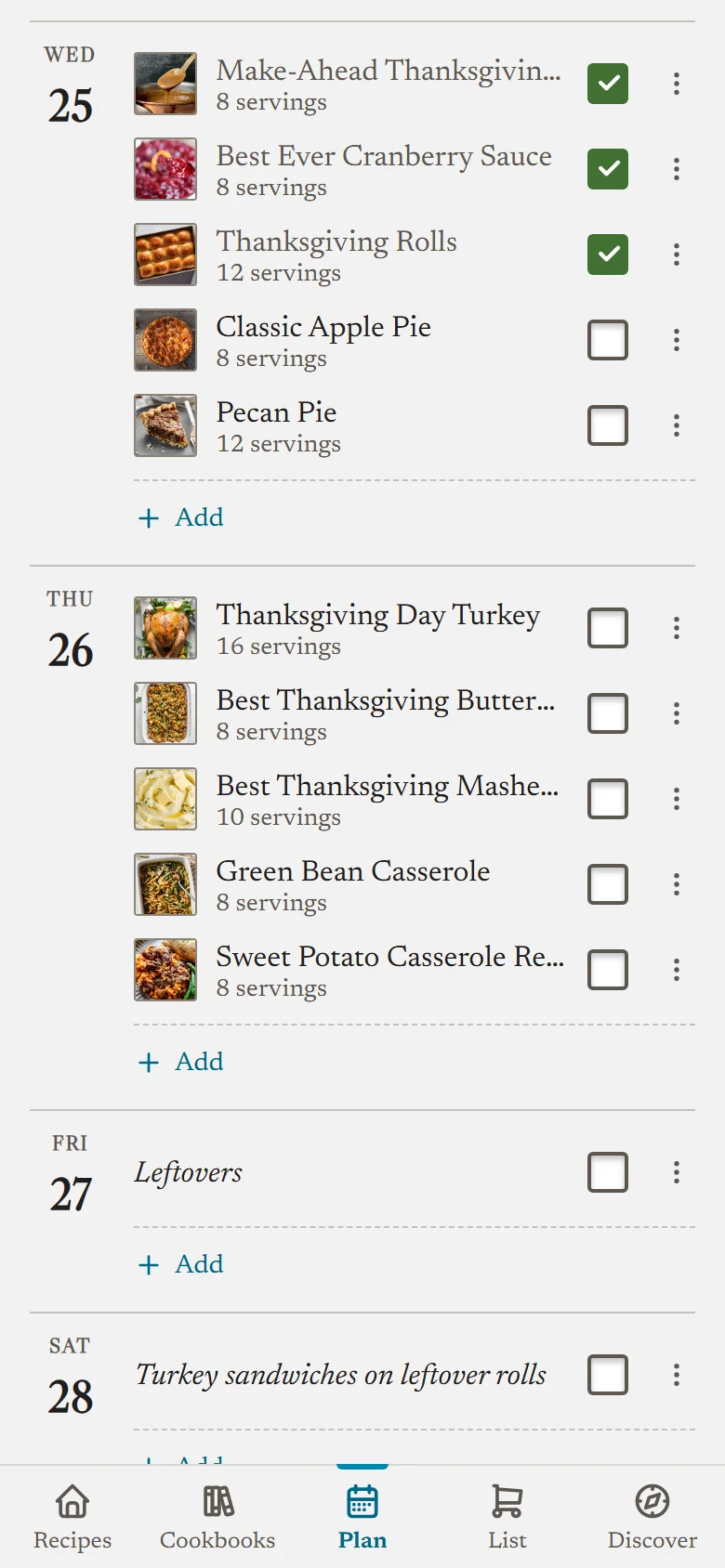
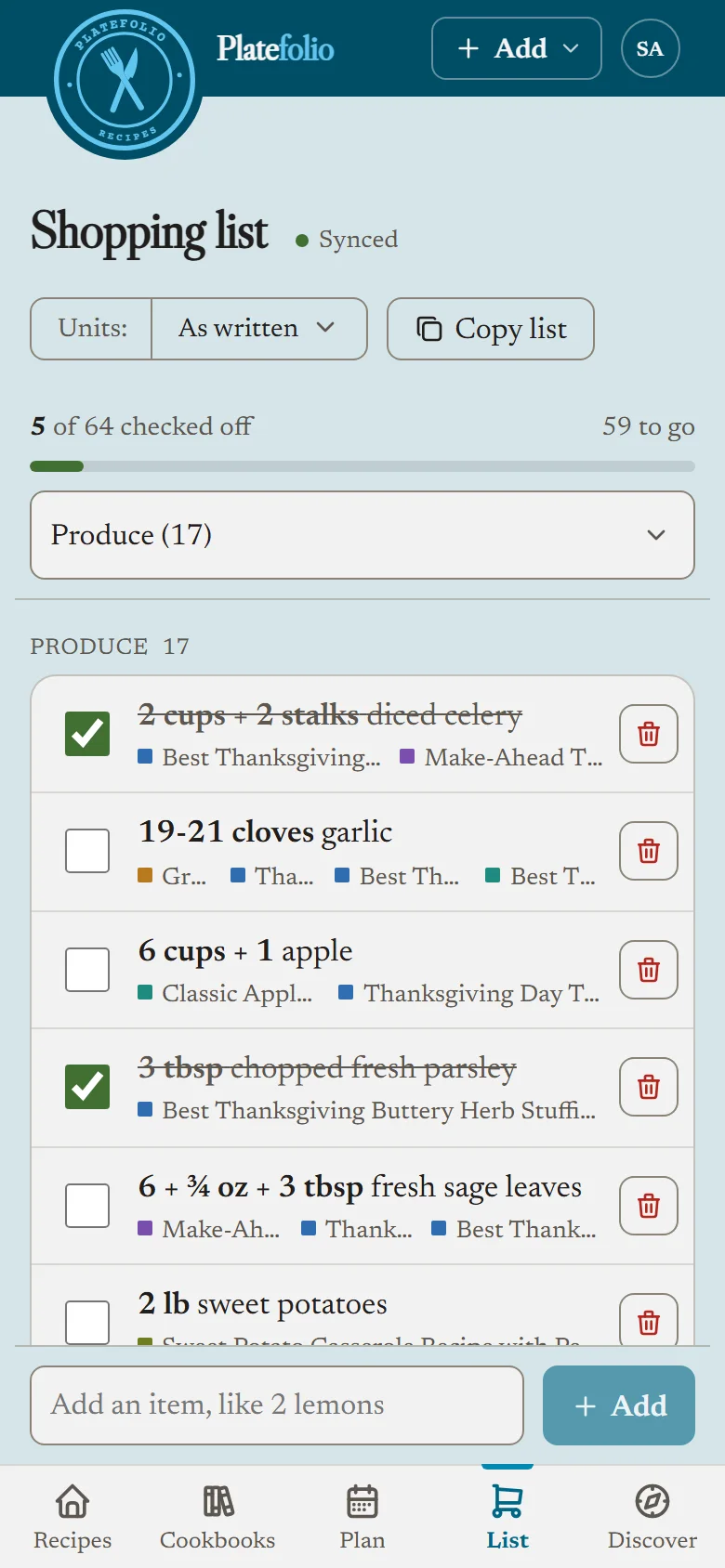
Combine recipes into one shopping list
When two recipes call for the same thing, it's one line on the list, not two lines you have to add up while you're in the store.
- Added up. 2 tbsp butter for the cake and 1 tbsp for the pan is 3 tbsp butter on the list.
- However it's written. "1 onion" and "2 onions, diced" is 3 onions, and "2 cloves garlic" and "3 garlic cloves" is 5 cloves garlic.
- Across units. 1 cup milk and 120 ml milk is 360 ml milk if you use metric, and baking staples like flour and sugar cross between cups and grams.
- Kept apart when it matters. Large eggs and small eggs, or two sizes of can, stay on their own lines.
How the list combines ingredients, in full.
Sorted by aisle, with pantry staples left off
- In store order. Produce, dairy and eggs, canned and dry goods, laid out the way most stores are, with a count of what's left in each aisle and a tap to jump to it.
- No salt on every list. Mark salt, olive oil or butter as a pantry staple once, and it stays off your list from then on. It's still shown when you add a recipe, so tick it the week you run out.
- Checked off as you shop. Checked items move out of the way, to the bottom of the list.
A whole week of meals in one grocery list
Plan the week on Platefolio's meal planner and send it to your list in one step. Each meal comes in at its own servings, so a double batch of chili needs twice the beans, and a recipe you've planned for two nights counts twice. Changed the plan? Add the week again and the list is brought up to date instead of doubled.
A shared family grocery list that works offline
- One list for the household. On the Head Chef plan, everyone in your household shares the list, and a change on one phone syncs to the other members.
- In a store with no signal. The list keeps a copy on your phone, so it still opens and you can keep checking things off. It syncs when you're back online, and shows the status at the top of the list until it has.
Grocery list FAQ
Can I make one grocery list from several recipes?
Yes. Add each recipe to your shopping list from its page, or plan the week on the meal planner and add every meal at once. They all go on one list, sorted by aisle. The list keeps track of which recipes are on it, so you can take one off later and leave the rest.
Does it combine the same ingredient from different recipes?
Yes. "1 onion" and "2 onions, diced" become "3 onions", and "1 cup milk" and "120 ml milk" become "360 ml milk" if you use metric. Different sizes, like large and small eggs, stay on separate lines. How the list combines ingredients.
Does the list scale to the servings I'm making?
Yes. Set the servings when you add a recipe, and the amounts on the list match. Meals from your meal plan come in at each meal's own servings, and a recipe planned twice counts twice.
Is the grocery list free?
Yes. The grocery list and the meal planner are free on every plan, with no limits, including the free Line Cook plan. Head Chef ($12 a year) adds sharing the list with up to 5 people in your household, plus unlimited recipe imports from links, photos and pasted text, instead of the free plan's 25.
Can my family share one grocery list?
Yes, on Head Chef. Everyone in your household shares one list and one set of pantry staples, and a change on one phone shows up on the others as it happens. Out of eggs while someone's already at the store? Add them at home and they're on the list in their hand.
Does the grocery list work offline?
Yes. Once you've opened the list on a phone, it keeps a copy, so it still opens in a store with no signal and you can keep checking things off. Your changes are saved on the phone and sync when you're back online.
Can I add things that aren't in a recipe?
Yes. Type anything into the box at the bottom of the list, like "paper towels" or "2 lemons", and it's sorted into its aisle with everything else.
Can I keep things I always have on hand off the grocery list?
Yes. Mark salt, olive oil or butter as a pantry staple once, and it stays off your list from then on. Staples still show when you add a recipe, so you can tick one the week you run out. How pantry staples work.
Can I send the list to another grocery list app?
Yes. Copy list copies everything you haven't checked off, one item per line in aisle order, ready to paste anywhere. On phones and browsers that support it, Share list sends it straight to the app you already use.
More in the help center: using the shopping list, scaling a recipe, using Platefolio offline, and inviting your household.
Free to use with unlimited recipe storage.
Upgrade for household sharing & unlimited premium features.