A recipe saver app for any website, video or photo.
Paste a link from a recipe site, a TikTok or YouTube video or Pinterest, snap a recipe card, paste a recipe out of an email or an AI chat, or bring over your whole collection from another app. Platefolio's recipe importer keeps the recipe and leaves the ads behind, and you check every import before it saves. Start on the free Line Cook plan with 25 imports, or go unlimited with Head Chef for $12 a year. Recipes you manually enter or save from other Platefolio cooks are unlimited and never count toward imports.
An app to save recipes from any website
Copy a recipe page's link and paste it into Platefolio, on your phone or your computer, with no browser extension to install. Most recipe sites and food blogs carry a recipe card, and the importer reads it directly: title, ingredients, steps, times, servings and the photo, with the pop-ups and the trip to Tuscany left behind.
- Food blogs and recipe sites. Anything with a recipe card usually imports cleanly. A recipe written into the middle of a post still comes through, though it's worth a closer look before you save.
- TikTok and YouTube. Paste the video's link, and the recipe comes from the caption or description, or from the recipe site it links to.
- Pinterest pins. Platefolio follows the pin to the site it links to, or reads the recipe written into the pin itself.
- Credit stays with the cook. Every imported recipe keeps a link back to the page it came from.
How importing from a link works, and what to do when a site blocks it.
A recipe scanner for photos, screenshots and handwritten cards
Some of the best recipes you have were never online: the cookbook with the cracked spine, the card in your grandmother's handwriting, the screenshot buried in your camera roll. Scan them into Platefolio and they're ready to scale, add to your weekly meal plan and shopping list, and cook from step by step on your phone.
- Family recipe cards. Keep the originals safe in the box and cook from a copy that can't get splattered.
- Cookbooks you already own. The three recipes you actually make from that book, without hunting for the page or propping it open on the counter.
- Screenshots. The recipe you grabbed from Instagram or an ebook gets saved alongside the rest of your collection.
Save recipes from ChatGPT, emails and anything you can copy
Recipes turn up in places no importer was built for: the one your aunt texted, the one in a newsletter, the dinner you worked out with ChatGPT last week. Paste it into Platefolio and it becomes a real recipe in your collection, instead of a message you'll never scroll back to.
- Recipes people send you. The one a friend emailed or your aunt texted lives with the rest of your recipes, not at the bottom of a thread.
- Dinners you worked out with AI. ChatGPT, Claude or Gemini came up with something good? Save it before it disappears into your chat history, with a prompt from Platefolio that makes it come through clean.
- Everything else. Forum posts, PDFs, a page with no recipe card: if you can select the text, you can save it.
Move your recipes from Paprika, Recipe Keeper or another app
Years of saved recipes shouldn't keep you in an app you've outgrown. Export your collection from Paprika, Recipe Keeper, Nextcloud Cookbook or RecipeSage and bring it to Platefolio in one go, with its photos, categories, star ratings and favorites.
- Bring the keepers, leave the clutter. Tick the recipes you actually cook and leave the rest behind. Come back for more any time without doubling up.
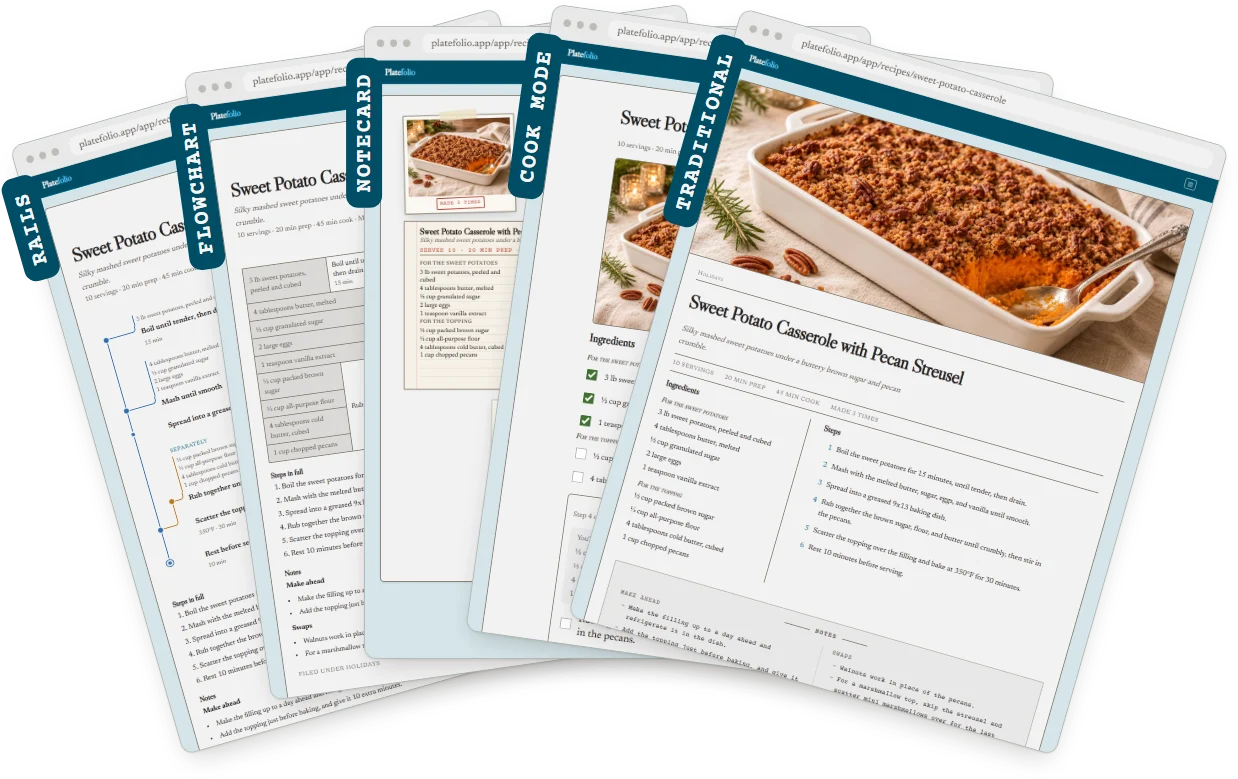
- Old favorites, new ways to cook them. Every recipe you bring over can switch between Platefolio's display formats, including a flowchart worked out from its steps.
- Your file stays with you. It's read on your device, and nothing is saved until you choose what comes over.
How to export from each app, and how Platefolio compares with Paprika and Recipe Keeper.
Check every recipe before it saves
However a recipe arrives, it opens in a review form first, so the worst case is a few seconds of tidying, never a mangled recipe you find halfway through making dinner.
- A shopping list you can trust. Each ingredient line shows how its amount, unit and ingredient were read, so a misread amount gets caught before it reaches your grocery list.
- Steps you can cook straight through. Storage tips, substitutions and make-ahead notes go into the recipe's notes, not in the middle of your method.
How to save recipes from TikTok, Instagram, Pinterest and more
Each guide walks through one place your recipes come from, from the share button to the saved recipe.
- Recipe websites and food blogs. Paste the page's link.
- TikTok. Paste the video's link. The recipe comes from the caption, or the recipe site it links to.
- Instagram. Paste the caption, or use a screenshot of the reel.
- Pinterest. Paste the pin's link, and Platefolio follows it to the recipe.
- YouTube. Paste the link to a video or a Short. The recipe comes from the description, or the site it links to.
- Facebook. Paste the post's text, or use a screenshot.
- ChatGPT, Claude or Gemini. One prompt formats the recipe, and you paste the reply.
- Screenshots, cookbooks and recipe cards. Crop the photo to the recipe and scan it.
- Emails, notes and messages. Copy the text and paste it in.
- Paprika, Recipe Keeper, Nextcloud Cookbook and RecipeSage. Choose the app's export file and bring the whole collection over.
Recipe saver app FAQ
What's the best app to save recipes?
The one that can read the places your recipes actually come from. Check whether it saves from recipe sites, TikTok, photos and screenshots, pasted text, AI chats and the app you use now, and whether you can fix an import before it saves. Platefolio does all of that, and the free plan includes 25 imports, with unlimited recipes you type in or save from other Platefolio cooks.
Can I save recipes from any website?
From most of them. Paste a recipe page's link and Platefolio reads the recipe card most recipe sites and food blogs include, photo and all, and leaves the ads and the life story behind. When a site blocks automatic requests or the page needs a sign-in, copy the recipe's text and paste it in, or take a screenshot and import that. What each import message means.
Do I need a browser extension to save recipes?
No. Copy the recipe page's address, then choose Add and From link in Platefolio and paste it. It works the same in a browser on your phone and on your computer, with nothing to install.
Can I save recipes from TikTok and Instagram?
Yes. A TikTok link imports directly: Platefolio reads the recipe from the caption, or follows the caption's link to the recipe site. Instagram doesn't let other apps read its posts, so paste the caption or use a screenshot of the reel instead. Saving from TikTok and from Instagram.
Can I save a recipe from ChatGPT?
Yes, and from Claude or Gemini too. Platefolio gives you a prompt that has the assistant rewrite the recipe in a layout the importer reads cleanly. Paste the reply and check it before it saves. The prompt and how to use it.
Can it import a handwritten recipe card?
Yes. Take a photo, crop it to the recipe and scan it. Neat, clear handwriting often reads well enough to save you most of the typing, so check the result closely before you save. The text is read on your own device first, and when that reading comes out poor, the photo is also sent to Google Cloud Vision for a second try (see the privacy policy).
Can I move my recipes from Paprika or another recipe app?
Yes, from Paprika, Recipe Keeper, Nextcloud Cookbook and RecipeSage. Export your collection from the old app, choose the file in Platefolio, and tick the recipes to bring over. The file is read on your device, not uploaded. Switching from Paprika and from Recipe Keeper show how the apps compare.
What if an import gets something wrong?
Every import opens in a review form before it saves, showing the title, each ingredient line with how it was read, and the steps, so you fix anything that's off right there. Nothing is saved until you choose Save recipe.
Can I organize the recipes I save?
Yes. Sort recipes into categories to filter your collection, and gather favorites into cookbooks with their own order, chapters and cover. Imported recipes work the same as ones you type in.
Is the recipe importer free?
Yes. The free Line Cook plan includes 25 imports, counted across links, pasted text, AI chats, photos and other apps, and an import only counts once you save it. Typing recipes in is always unlimited, and so is saving recipes other cooks have shared publicly. Head Chef ($12 a year for up to 5 people in your household) makes imports unlimited. Compare the plans.
What does an imported recipe keep?
The title, ingredients, steps, servings, times, the photo and a link back to the source, plus any notes on the recipe card, like storage or substitutions. Then it's a recipe like one you typed in: you can scale it, put it on your grocery list, and switch between Platefolio's display formats, including a recipe flowchart.
Every plan is in full on the pricing page, and the help center explains how imports are counted.
Free to use with unlimited recipe storage.
Upgrade for household sharing & unlimited premium features.