A Paprika Recipe Manager alternative with five ways to view every recipe.
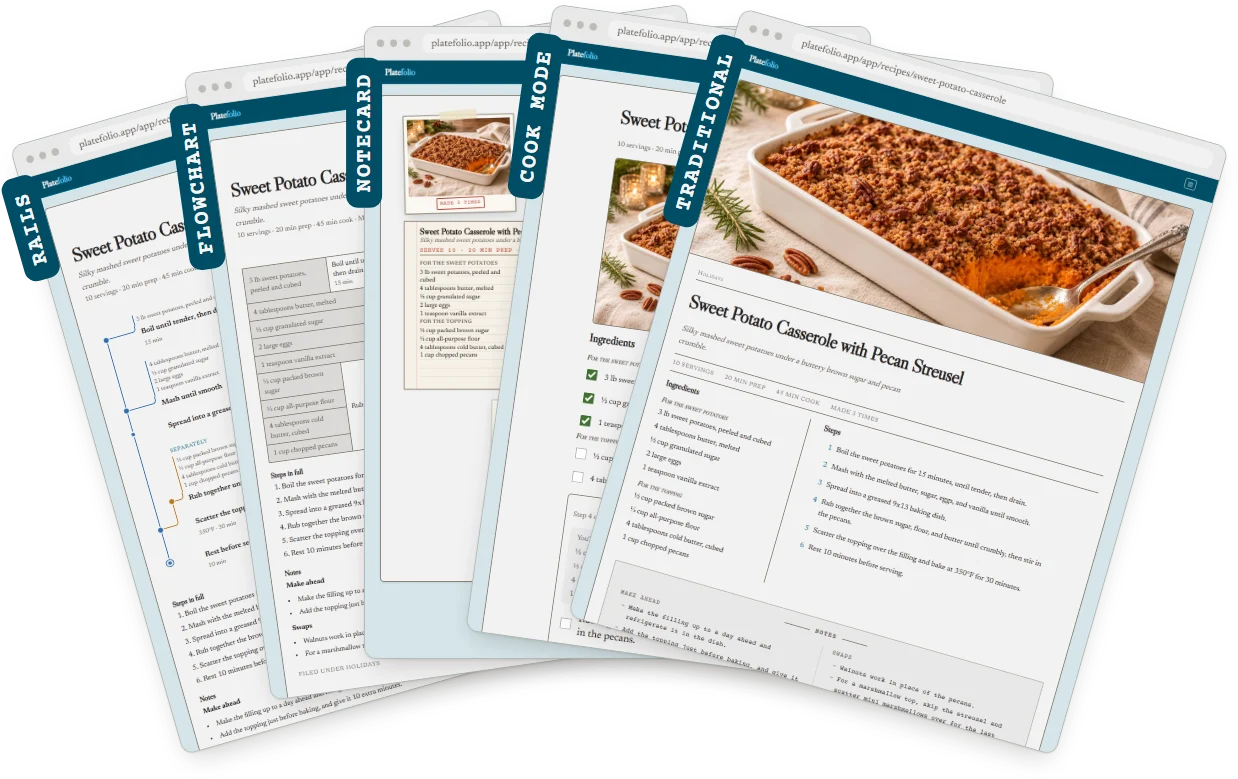
Platefolio is a free Paprika alternative with no limit on recipes you enter yourself or save from other Platefolio cooks, on every device, and five ways to view every recipe. Bring your Paprika Recipe Manager recipes with you: export your library, open the file in Platefolio, and pick the recipes you want, each with its photo, ingredients, steps and categories. Open any of them as a classic recipe page, a printable 4x6 notecard, or a flowchart where ingredients merge into their steps. Rails lays that same chart out top to bottom, sized for a phone. Or cook from it in cook mode, one step at a time with that step's ingredients beside it.
Imports: bring over up to 25 of your Paprika recipes for free to try out Platefolio. If you like it, upgrade to the Head Chef plan ($12 a year, shared with up to five people) to import all your Paprika recipes plus unlimited imports from links, pasted text, or photos and screenshots of recipes. Unlimited recipes entered manually or saved from other Platefolio cooks are available on either plan.
Platefolio vs. Paprika 4
| Platefolio | Paprika 4 | |
|---|---|---|
| Free plan | Unlimited recipes entered manually or saved from other Platefolio cooks, on all your devices, plus 25 imports | Up to 50 recipes, on one device with no sync |
| Paid plan | Head Chef, $12 a year for up to 5 people. Unlimited recipes and imports, plus unlimited photos and cookbooks | Premium, $14.99 a year for up to 6 people. Unlimited recipes and imports |
| Sharing with your household | One $12 Head Chef plan covers up to 5 people, each with their own sign-in, sharing every recipe, cookbook, meal plan and grocery list | One $14.99 Premium plan covers up to 6 people, each with their own sign-in, sharing every recipe, cookbook, meal plan and grocery list |
| Where it runs | Any web browser: phone, tablet, computer, Chromebook, Linux | Apps for iPhone, iPad, Mac, Android and Windows, no web version |
| Ways to view a recipe | Five: classic page, cook mode, 4x6 notecard, flowchart, rails. See a demo of all five views. | One recipe page, plus cook mode |
| Importing recipes | Links, pasted text, photos and screenshots of printed or handwritten recipes, recipes from ChatGPT, Claude or Gemini using our prompt, and export files from Paprika, Recipe Keeper, Nextcloud Cookbook and RecipeSage, on both plans | Links on every plan. Pasted text and photos of recipes on Premium only |
| Scaling and units | Scale any recipe, and convert between US and metric | Scale any recipe, and convert between US and metric |
| Works offline | Your whole collection, cook mode, grocery list and meal plan, with one setting | Yes, in the apps |
| Meal planning and shopping | Meal planner and shopping list | Meal planner and shopping list |
| Cookbooks | 1 on the free plan, unlimited on the Head Chef plan | None on the free plan, unlimited on Premium |
Compared on November 2026.
Where Platefolio is still growing
Paprika has a head start in a few places, and we're working to close the gap.
- Editing offline. Paprika's apps let you add and edit recipes with no internet. Platefolio keeps your whole collection, grocery list and meal plan on your phone, but adding or editing a recipe waits until you're back online.
- Hands-free cooking. Paprika's cook mode reads steps aloud and takes voice commands. Ours shows one step at a time with that step's ingredients, and you move it along yourself.
- Pantry tracking. Paprika counts what you have and when it expires. Platefolio keeps your staples off the grocery list but doesn't track amounts yet.
- Nutrition. Paprika Premium works out nutrition for each recipe. Platefolio doesn't yet.
How to import your Paprika recipes
-
Export from Paprika.
On a Mac or Windows PC, select your recipes, choose File > Export, then Paprika
Recipe Format. On a phone or tablet, Export is in Paprika's settings. You get one file
ending in
.paprikarecipes. - Open it in Platefolio. In Settings, under Import from Another App, choose your export file.
- Pick the recipes you want. Every recipe in the file is listed. Tick the ones you want. Recipes you already brought in are marked, so choosing the same file again picks up where you left off.
On the free plan, each recipe you bring in uses one of your 25 imports, and each photo uses one of your 25 photo slots. The Head Chef plan has no limit on either, so your whole library comes over at once.
Switching from Paprika: common questions
Can I import my Paprika recipes into Platefolio?
Yes. Export your library from Paprika, open the file in Platefolio, and pick the recipes you want. Each recipe's title, ingredients, steps, servings, times, source link, notes and photo come over, plus your categories, star ratings and favorites. Nutrition goes into the recipe's notes. If a recipe has several photos, the first one comes over.
Is my Paprika file uploaded?
No. Your file is read on your own device, and nothing is saved until you choose which recipes to bring over. Only those recipes and their photos are saved to your account.
How many recipes can I bring over for free?
The free plan includes 25 imports, and each recipe you bring over from your file uses one. The Head Chef plan has no limit, so you can bring over your whole library. If you upgrade partway, choose the same file again and pick up where you left off.
Do my meal plans and grocery lists come over?
No. Paprika's export file holds your recipes only. Platefolio has its own meal planner and grocery list, free on every plan, so you can start fresh with your recipes already in place.
Do I need to stop using Paprika first?
No. Exporting leaves everything in Paprika as it was, so you can try Platefolio with your own recipes before deciding.
Is there a free alternative to Paprika?
Yes. Platefolio is free with no limit on recipes you enter yourself or save from other Platefolio cooks, on every phone, tablet and computer, with no ads. The free plan includes 25 imports from your Paprika file, a link, pasted text or a photo. For a bigger library, Head Chef ($12 a year) brings over the rest and covers up to 5 people.
How else can I add recipes?
Paste a link from any recipe site. Paste a recipe's text. Take a photo of a cookbook page or a handwritten card, or use a screenshot. Or send our prompt to ChatGPT, Claude or Gemini, and it formats any recipe in the chat for Platefolio to read. You can also type recipes in yourself, or save public recipes other cooks have shared.
How do I open a .paprikarecipes file?
Open it in Platefolio. Sign up for free, open Settings, and under Import from Another App, choose your export file. Platefolio lists every recipe in it, and you pick the ones you want. Your file is read on your own device.
Does this work with Paprika 3?
Yes. Export your recipes from Paprika 3 in Paprika Recipe Format, then open the .paprikarecipes file in Platefolio, the same way as with Paprika 4.
If it's free, are there ads?
No, and there never will be, on any plan. Platefolio is paid for by Head Chef subscriptions, not advertisers, and it never sells your information.
Is there a web version of Paprika, or a version for Chromebook?
Paprika has no web version. Its apps run on iPhone, iPad, Mac, Android and Windows. Platefolio runs in any web browser, including on a Chromebook or Linux, with nothing to install, and it can bring your Paprika recipes over in one file.
Is there a Platefolio app for iPhone and Android?
Platefolio works in any web browser, and on a phone you can add it to your home screen. Apps for your phone are coming. The web app already works offline: keep your whole collection on your phone from Settings, and every recipe, your grocery list and your meal plan work with no signal.
Can my family use it too?
The Head Chef plan, $12 a year, covers up to 5 people, each invited with their own sign-in. Everyone sees and edits the same recipes, cookbooks and categories.
Free to use with unlimited recipe storage.
Upgrade for household sharing & unlimited premium features.