Turn any recipe into a Cooking for Engineers flowchart.
Save a recipe from a link, a photo, or pasted text, and Platefolio draws it as a chart in
the style Michael Chu made famous on Cooking for Engineers: ingredients down the left, each
step to the right of what it uses, merging until the last column is the finished dish. The
chart is one of five ways this recipe app shows every
recipe, alongside a classic recipe page, cook mode, a printable notecard, and Rails, the
same chart top to bottom for a phone.
Boil the sweet potatoes for 15 minutes, until tender, then drain.
Mash with the melted butter, sugar, eggs, and vanilla until smooth.
Spread into a greased 9x13 baking dish.
Rub together the brown sugar, flour, and butter until crumbly, then stir in the pecans.
Scatter the topping over the filling and bake at 350°F for 30 minutes.
Rest 10 minutes before serving.
Sweet Potato Casserole with Pecan Streusel
Silky mashed sweet potatoes under a buttery brown sugar and pecan crumble.
10 servings · 20 min prep · 45 min cook · Made 3 times
Sweet Potato Casserole with Pecan Streusel as a flowchart: ingredients enter on the left and merge rightward into each step.
3 lb sweet potatoes, peeled and cubed
4 tablespoons butter, melted
½ cup granulated sugar
2 large eggs
1 teaspoon vanilla extract
½ cup packed brown sugar
⅓ cup all-purpose flour
4 tablespoons cold butter, cubed
1 cup chopped pecans
Steps in full
Boil the sweet potatoes for 15 minutes, until tender, then drain.
Mash with the melted butter, sugar, eggs, and vanilla until smooth.
Spread into a greased 9x13 baking dish.
Rub together the brown sugar, flour, and butter until crumbly, then stir in the pecans.
Scatter the topping over the filling and bake at 350°F for 30 minutes.
Rest 10 minutes before serving.
Notes
Make ahead
Make the filling up to a day ahead and refrigerate it in the dish.
Add the topping just before baking, and give it 10 extra minutes.
Swaps
Walnuts work in place of the pecans.
For a marshmallow top, skip the streusel and scatter mini marshmallows over for the last 10 minutes.
01
Recipe flowchart example: sweet potato casserole
Here's a sweet potato casserole as a flowchart on a laptop and as Rails on a phone. The
filling and the pecan topping start on separate rows and meet where the topping is
scattered over. Scroll the chart to follow the whole recipe.
platefolio.app/app/recipes/sweet-potato-casserole
Platefolio
Sweet Potato Casserole with Pecan Streusel
Silky mashed sweet potatoes under a buttery brown sugar and pecan crumble.
10 servings · 20 min prep · 45 min cook · Made 3 times
Sweet Potato Casserole with Pecan Streusel as a flowchart: ingredients enter on the left and merge rightward into each step.
3 lb sweet potatoes, peeled and cubed
4 tablespoons butter, melted
½ cup granulated sugar
2 large eggs
1 teaspoon vanilla extract
½ cup packed brown sugar
⅓ cup all-purpose flour
4 tablespoons cold butter, cubed
1 cup chopped pecans
Steps in full
Boil the sweet potatoes for 15 minutes, until tender, then drain.
Mash with the melted butter, sugar, eggs, and vanilla until smooth.
Spread into a greased 9x13 baking dish.
Rub together the brown sugar, flour, and butter until crumbly, then stir in the pecans.
Scatter the topping over the filling and bake at 350°F for 30 minutes.
Rest 10 minutes before serving.
Notes
Make ahead
Make the filling up to a day ahead and refrigerate it in the dish.
Add the topping just before baking, and give it 10 extra minutes.
Swaps
Walnuts work in place of the pecans.
For a marshmallow top, skip the streusel and scatter mini marshmallows over for the last 10 minutes.
Platefolio
Sweet Potato Casserole with Pecan Streusel
Silky mashed sweet potatoes under a buttery brown sugar and pecan crumble.
10 servings · 20 min prep · 45 min cook · Made 3 times
3 lb sweet potatoes, peeled and cubed
4 tablespoons butter, melted
½ cup granulated sugar
2 large eggs
1 teaspoon vanilla extract
Separately
½ cup packed brown sugar
⅓ cup all-purpose flour
4 tablespoons cold butter, cubed
1 cup chopped pecans
Steps in full
Boil the sweet potatoes for 15 minutes, until tender, then drain.
Mash with the melted butter, sugar, eggs, and vanilla until smooth.
Spread into a greased 9x13 baking dish.
Rub together the brown sugar, flour, and butter until crumbly, then stir in the pecans.
Scatter the topping over the filling and bake at 350°F for 30 minutes.
Rest 10 minutes before serving.
Notes
Make ahead
Make the filling up to a day ahead and refrigerate it in the dish.
Add the topping just before baking, and give it 10 extra minutes.
Swaps
Walnuts work in place of the pecans.
For a marshmallow top, skip the streusel and scatter mini marshmallows over for the last 10 minutes.
Flowchart on a laptop.
On a phone, Rails shows the same chart vertically.
Flowchart on a laptop, top. On a phone, Rails shows the same chart vertically, so nothing scrolls sideways.
02
How to read a Cooking for Engineers recipe table
Ingredients listed on the left, in the order they're used, so the first one
you need is at the top.
Each step to the right of the ingredients it uses. A step's box is as tall
as the ingredients it combines, so you can see at a glance that the butter, sugar, eggs, and
vanilla all go into the same bowl.
Steps merge into the finished dish. Each column brings more of the
recipe together, until one box spans the whole chart.
Michael Chu introduced this format on Cooking for Engineers,
where every recipe ends in one of his recipe summary tables. Parts of a recipe that don't
depend on each other sit on separate rows, so the chart shows what can happen side by
side, like mixing a topping while the potatoes boil.
03
Turn any recipe into a flowchart, automatically
When you save a recipe, Platefolio reads the steps and listed ingredients together to lay out the chart. Groups like "For the sauce" help it find the
parts that come together later.
Any recipe you save. Paste a link from a recipe site, take a photo of a
cookbook page or a handwritten card, paste the text, or type it in. Recipes you bring
over from another recipe app get a flowchart too.
Edit the result. Most charts come out close, but when a recipe doesn't say which ingredient goes where,
Platefolio has to guess. You can move an ingredient to the right step or join two parts
where they really meet, and Platefolio keeps your version.
How to fix a chart.
Cook mode follows it. The same chart decides which ingredients cook
mode lists beside each step, so fixing it once fixes both views.
Scaled and converted. Make it for 12, or switch to metric and degrees
Celsius, and the amounts in the chart change with the recipe.
04
Rails: a vertical recipe flowchart for phones
A wide chart is hard to follow on a phone. Rails, on the phone in the demo above, lays out
the same chart top to bottom: each step is a stop on a line, and ingredients and other
parts of the recipe join at the step that uses them, so nothing scrolls sideways. Switch
between the two on any recipe, on any screen.
05
Print or pin a recipe flowchart
Print a flowchart like any other recipe; wide charts fit best in landscape. Share a
recipe publicly and you can pin it to Pinterest
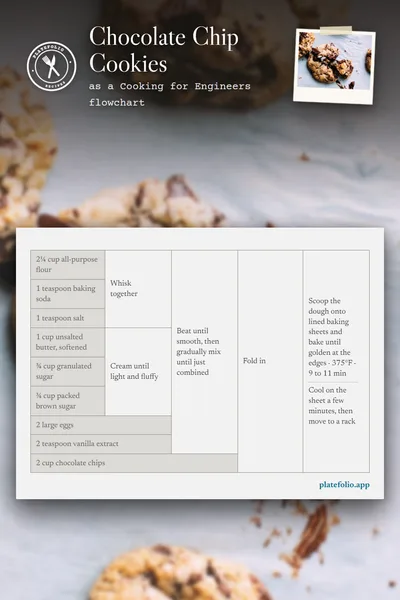
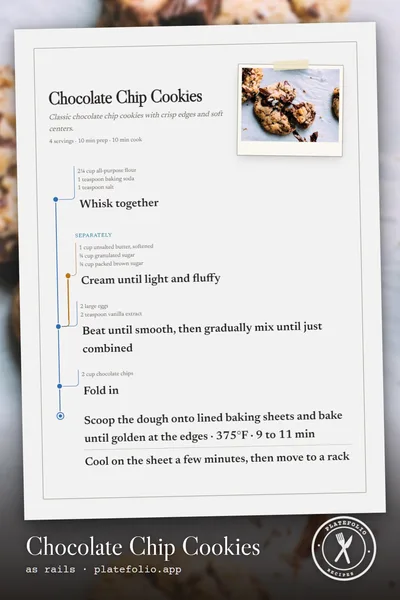
as a flowchart or Rails image, like these.
Recipe flowchart FAQ
What is a Cooking for Engineers recipe flowchart?
A recipe written as a table, from Michael Chu's website Cooking for Engineers. Ingredients run down the left in the order they're used, each step sits to the right of the ingredients it uses, and the steps merge until the last one is the finished dish. Chu calls it a recipe summary table. You'll also see it called a tabular recipe, a recipe diagram, or a recipe flowchart.
Is there an app that shows recipes as flowcharts?
Yes. Platefolio shows every recipe you save as a Cooking for Engineers style flowchart, alongside a classic recipe page, cook mode, a 4x6 notecard, and Rails, the same flowchart laid out top to bottom for a phone. It runs in any web browser, and it's free.
How do I turn a recipe into a flowchart?
Save it in Platefolio: paste a link or the recipe's text, take a photo of it, or type it in. Platefolio draws the flowchart when you save, and you pick Flowchart above the recipe to see it. If an ingredient lands on the wrong step, move it to the right one.
Does every recipe work as a flowchart?
Nearly every recipe with steps. Chu noted that recipes which set part of a mixture aside and add it back later don't fit his table neatly. Platefolio brings the set-aside part back in as its own row, labeled with what it is, so the chart still reads left to right.
Is there a free recipe flowchart maker?
Yes. Platefolio's flowchart, like all five ways to view a recipe, is free on every plan, with no limit on recipes you type in yourself. The free Line Cook plan includes 25 imports from links, pasted text, or photos. Head Chef ($12 a year, for up to 5 people) has no import limit.
Can I print a recipe flowchart?
Yes. Open the recipe as a flowchart and print it. Wide charts fit better on paper set to landscape. See Print a recipe.
Can I see a recipe flowchart on my phone?
Yes. Platefolio runs in your phone's browser, and Rails shows the flowchart top to bottom so it fits a phone screen with no sideways scrolling. You can keep your whole collection on your phone, too, and cook from it with no signal.
Is Platefolio part of Cooking for Engineers?
No. The format is Michael Chu's, and Platefolio draws recipes in its style. Cooking for Engineers is still the place to see the format in its original home, with a chart for each of his recipes.