A weekly meal planner that turns your recipes into one grocery list.
Plan your meals for the week: pick from your saved recipes, or add a note for leftovers or a night out. Copy last week's plan to get a head start, set the servings for each meal, then send the whole week to your grocery list. The meal planner and grocery list are both free, and on the Head Chef plan your whole household can share and plan together.
A weekly meal plan built from your recipes
Stop wondering what's for dinner every night and start planning your meals for the week.
- Plan while you browse. Find a recipe you want to try? Add it to your weekly meal plan right from the recipe.
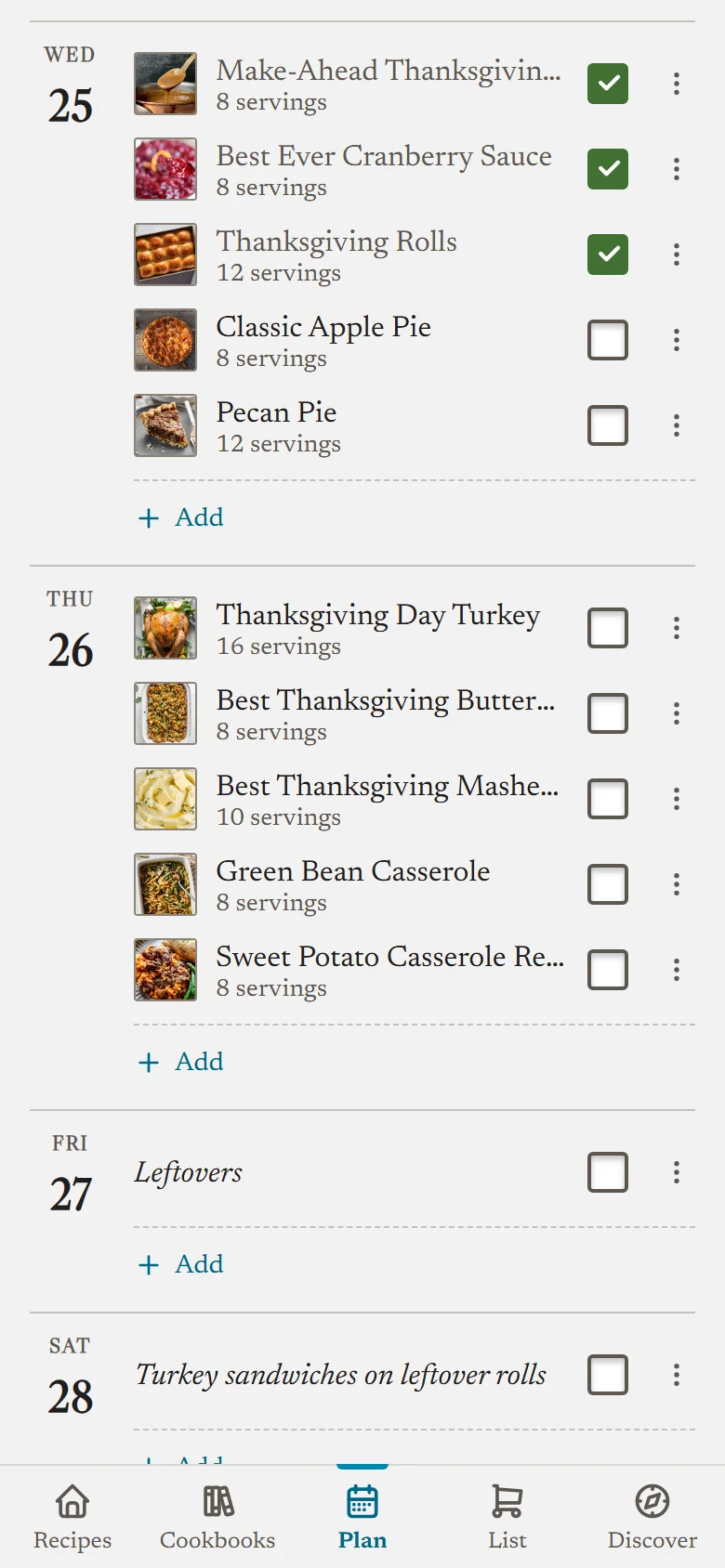
- Big meals, planned in full. Put a main and two sides on one day, or all of Thanksgiving, and nothing gets forgotten.
- Room for real life. Leftovers, takeout and dinner at Mom's go on the plan as notes, so it matches the week you'll actually have.
- Plans change, so the week does too. Practice runs late? Swap Tuesday and Friday in a couple of taps, or drag a meal across on a computer.
- Holidays sorted early. Put Thanksgiving or a birthday dinner on the plan months ahead, and it's ready when the week arrives.
A meal planning app with a grocery list built in
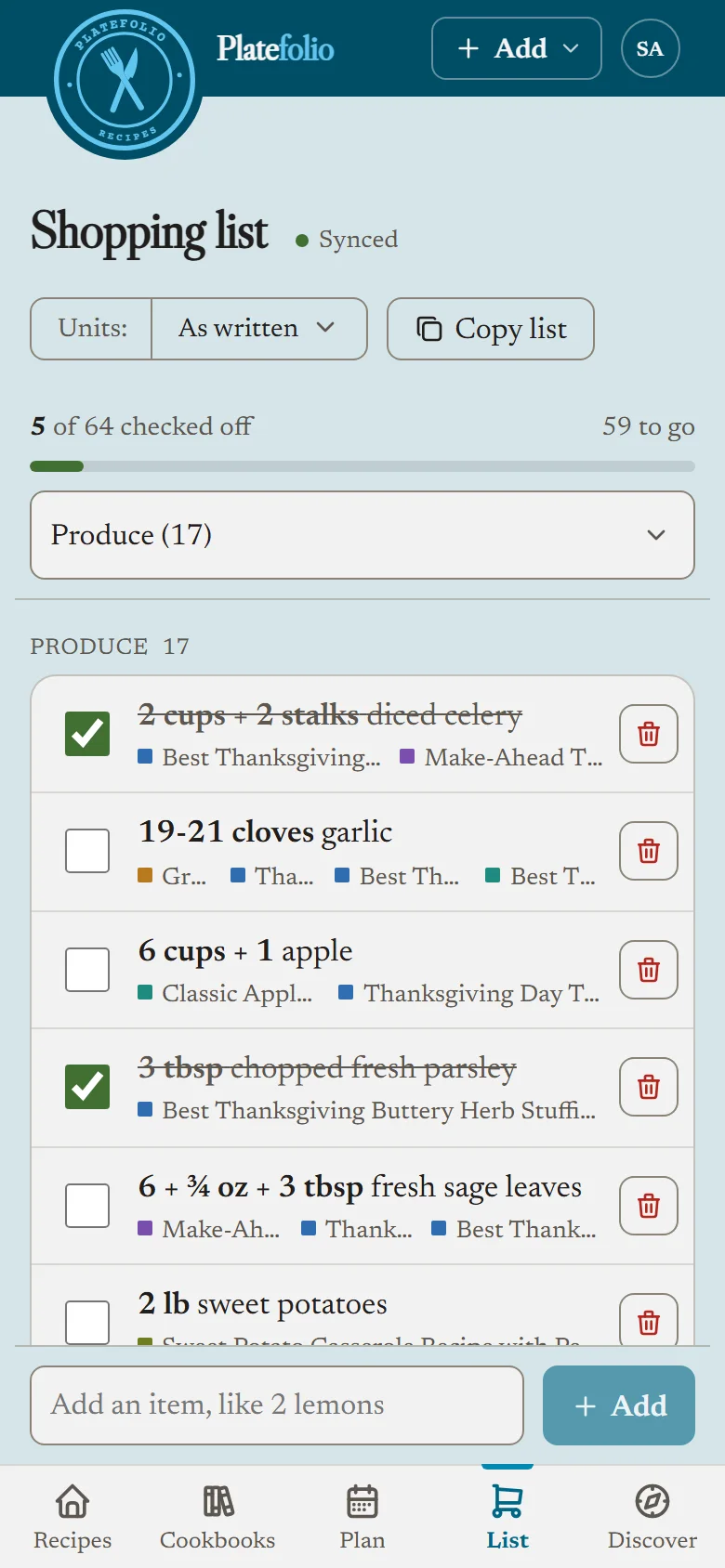
Turn your weekly meal plan into a grocery list in one tap, and shop for the whole week on one list.
- No math while shopping. The same ingredient from multiple sources gets combined. Onions from three recipes become one line and a dish you're making twice gets double the ingredients.
- Scale your servings and ingredients. Cooking for eight on Saturday? Set the servings per planned meal and Platefolio will make sure the correct amount of ingredients are added to the list.
- Ingredients grouped by aisle. Ingredients added to the list will be grouped by common grocery store aisle setups.
- No double buying. Change the plan and send it again, and the list updates instead of doubling. Drop a meal and you choose whether its ingredients stay or come off as well.
A meal prep planner that scales your recipes
Making a double batch for Sunday meal prep? Set the servings once on the plan, and when you open the recipe to cook, every amount is already scaled to match. No multiplying fractions at the stove, and you cook with exactly what you bought.
Reuse your weekly meal plan in one tap
Don't start every week from scratch. Copy last week's plan as a starting point, then swap in what's new.
- Start from last week. On an empty week, one tap copies last week's meals onto the same days, at the same servings.
- Find your family's favorites. Tick off meals as you cook them and Platefolio counts how often you make each recipe. Sort your recipes by times made and your regulars rise to the top.
- Works in the kitchen, signal or not. Ticking off a meal works offline and syncs when you're back online.
A family meal planner the whole household shares
Stop texting about what's for dinner. On the Head Chef plan, up to 5 people in your household share one meal plan and one grocery list.
- Everyone pitches in. Anyone in the household can add a meal, move a night around or leave a note.
- Whoever's shopping has the whole list. Every planned meal's ingredients, combined and sorted by aisle, on the phone of whoever's at the store.
- One price for the whole household. $12 a year covers everyone, not just one person.
Meal planner app FAQ
Is there a free meal planner app?
Yes. The meal planner and the grocery list are free on every plan, with no limits, including the free Line Cook plan. Head Chef ($12 a year) adds sharing the plan with up to 5 people in your household, plus unlimited recipe imports from links, photos and pasted text, instead of the free plan's 25.
Can I plan more than one meal a day?
Yes. Add as many recipes and notes to a day as you need, and put them in the order you'll make them.
Can I add something that isn't a recipe?
Yes. Add a note instead, like "leftovers" or "dinner at Mom's". Notes sit on the day with your recipes, and can be up to 300 characters.
Does the meal planner make a grocery list?
Yes. "Add this week to shopping list" puts the ingredients for every meal you haven't cooked yet on one grocery list, each at its own servings, combined and sorted by aisle. Uncheck what you already have before you add them.
Is there a meal planner calendar?
The planner shows one week at a time, and a calendar lets you jump to any week, with every day that has something planned marked. You can plan up to two years ahead and look back about a year and a half.
Can I share a meal plan with my family?
Yes, on Head Chef. Everyone in the household shares one meal plan and one grocery list, so whoever does the shopping sees what everyone planned.
Can I reuse last week's meal plan?
Yes. On an empty week, "Copy last week" fills it with last week's meals on the same days, at the same servings.
Does the meal planner work offline?
Partly. A week you've opened before on a device still shows with no signal, and you can tick off what you've cooked, which syncs once you're back online. Adding, moving, or removing meals needs a connection.
More in the help center: using the meal planner, scaling a recipe, and inviting your household.
Free to use with unlimited recipe storage.
Upgrade for household sharing & unlimited premium features.