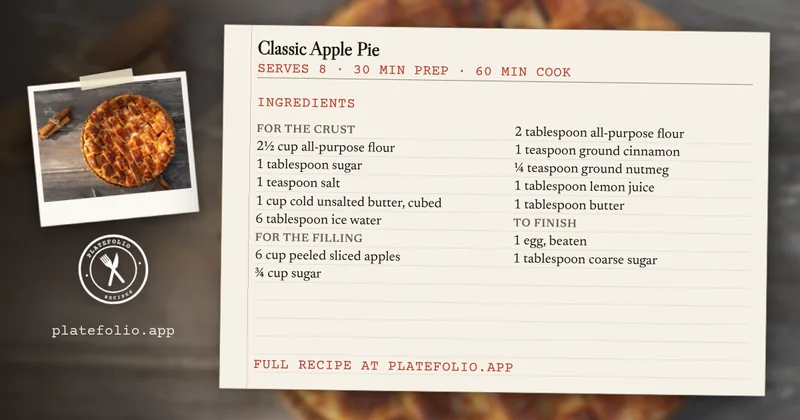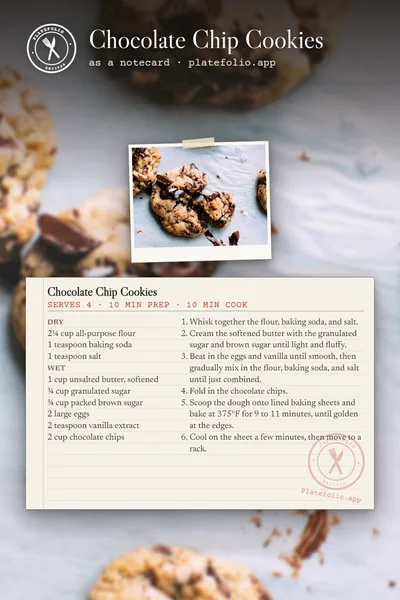
Turn any recipe into a printable 4x6 recipe card.

Paste a link from any food blog, snap a photo of a cookbook page, or copy a recipe out of ChatGPT or any AI assistant, and Platefolio makes the 4x6 recipe card for you, with no template to fill in. Print it for your recipe box or keep it as a digital recipe card. The card is one of five ways this recipe app shows every recipe, alongside a classic recipe page, cook mode, and two recipe flowcharts.

A recipe card maker with no template to fill in

Most recipe card templates leave you retyping every line into little boxes. Platefolio's recipe card generator works from the recipe you already saved, so the card gets filled in automatically, for every recipe in your collection.

Printed recipe cards come out at their real size, 4x6 inches, so they file in a recipe box with the cards you already have. A long recipe prints as a stack of up to four cards, ingredients first, then steps.

Step by step, with the printer settings: Print a recipe.

Digital recipe cards on your phone or laptop

You don't have to print it. On screen the card scales to fit, so it's as easy to read on a phone as on paper, with the recipe's photo alongside it. Switch any recipe between the card and the other four formats with one tap, and keep your whole collection on your phone to cook from offline.

Recipe card FAQ

Is there a free recipe card maker?

Yes. Platefolio's notecard, like all five ways to view a recipe, is free on every plan, with no limit on recipes you type in yourself. The free Line Cook plan includes 25 imports from links, pasted text, or photos. Head Chef ($12 a year, for up to 5 people) has no import limit.

Is this a recipe card template?

No, and that's the point. A template gives you blank boxes to retype a recipe into. Platefolio lays the card out from the recipe you saved, so a link, a photo or a pasted recipe becomes a finished 4x6 card, and changing the recipe updates the card.

What size are the recipe cards?

4x6 inches, the size of a standard index card. On screen the card scales to fit, and printed it comes out at its real size.

How do I print recipe cards?

Open the recipe, pick Notecard above it, and print. Set your printer to 4x6 photo paper or index cards if it has the option, and turn off any "fit to page" setting so the card prints at its real size. See Print a recipe.

Can I print recipe cards on plain paper?

Yes. Each card prints at 4x6 inches on its own page, with a thin border to cut along, ready to file in your recipe box.

What if a recipe doesn't fit on one card?

It becomes a stack of up to four cards: the ingredients on the first, then the steps, carrying on to a third or fourth card if it needs them. A recipe that would need more than four can't show as a notecard, so the Notecard option is greyed out with the reason, and every other format still works. See A format is greyed out.

Can I change the card's design?

No, every card uses the same design. What you change is what's on it: edit the recipe, or change its servings or units, and the card lays itself out again.

Can I make recipe cards from recipes I already have?

Yes. Paste a link from any food blog, snap a photo of a cookbook page, or copy a recipe out of ChatGPT or any AI assistant, and every recipe you save can show as a card. You can bring a whole collection over from another recipe app too. See the recipe importer.

Does the card show the recipe's photo?

On screen, yes, beside the card. Printed cards leave the photo off, and the recipe's notes print after the cards at card width.

Can I share a recipe card?

Yes. Make the recipe public, then pin it to Pinterest as a notecard image, or use Copy notecard link so the link previews as the card on Facebook, X, Bluesky, Mastodon or in a text. See Share a recipe or cookbook.

More in the help center: all five ways to view a recipe, printing a recipe, and why a format is greyed out.

Build your latefolio

Free to use with unlimited recipe storage.
Upgrade for household sharing & unlimited premium features.