A Mela recipe app alternative for every phone and computer in the house, not just Apple devices.
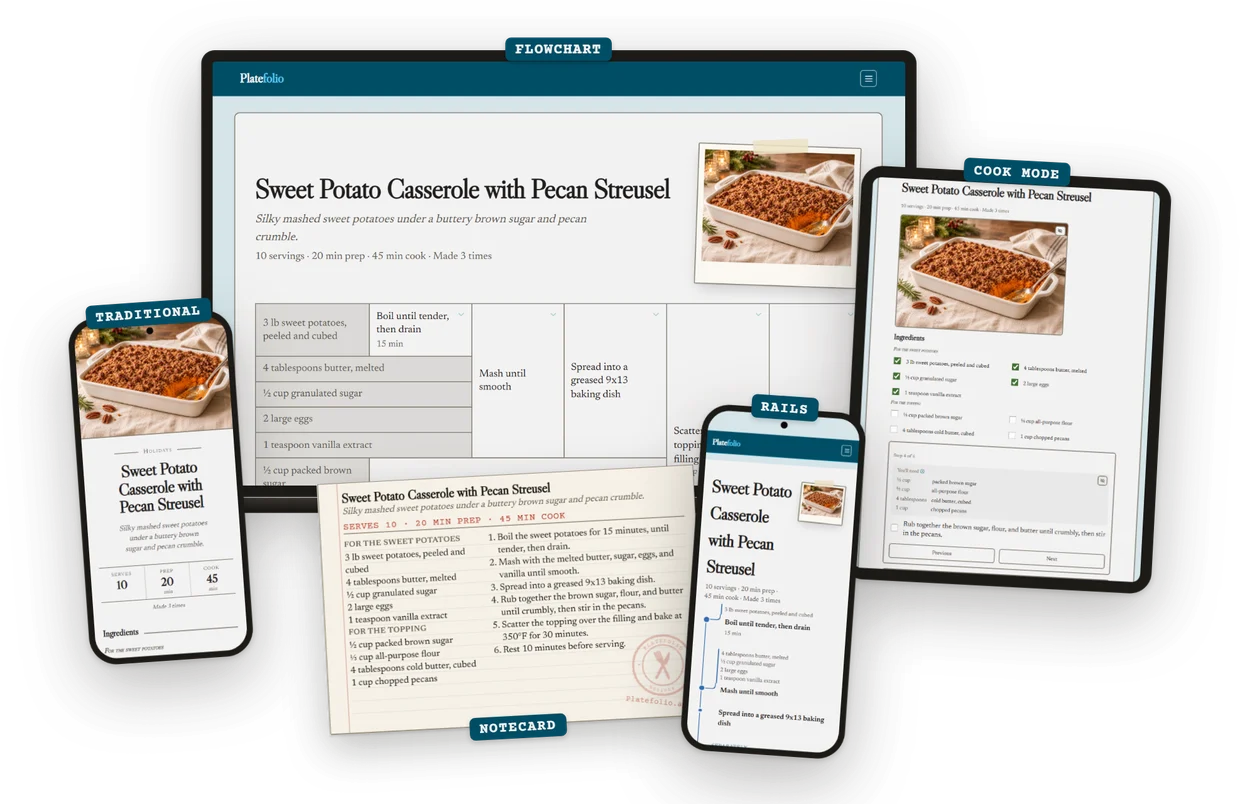
Mela only runs on iPhone, iPad and Mac. Platefolio is a cross-platform recipe app that runs in any web browser, so one account works on all of your devices: an Android phone, a Windows PC, even a Chromebook. The Head Chef plan covers up to five people for $12 a year. Every recipe opens five ways: a classic page, cook mode, a 4x6 notecard, a flowchart or rails. Bring your Mela recipes over in one .melarecipes file, photos included.
Imports: Mela's free version holds 10 recipes, so your whole collection fits in the 25 free imports on a new account. For a bigger library, the Head Chef plan ($12 a year, shared with up to five people) imports everything. Recipes entered manually or saved from other Platefolio cooks are unlimited on either plan.
Platefolio vs. Mela
| Platefolio | Mela | |
|---|---|---|
| Free plan | Unlimited recipes entered manually or saved from other Platefolio cooks, plus 25 imports, enough to bring over a whole free Mela library | Up to 10 recipes |
| Paid plan | Head Chef, $12 a year for up to 5 people: five paid plans for the price of one. Unlimited recipes and imports, plus unlimited photos and cookbooks | Mela+, one-time: $6.99 on iPhone and iPad, $14.99 on Mac, bought separately |
| Sharing with your household | One $12 Head Chef plan covers up to 5 people, each with their own sign-in, sharing every recipe, cookbook, meal plan and grocery list | Share a recipe library with other iCloud users. The upgrade works with Apple Family Sharing |
| Where it runs | Any web browser: iPhone, Android, iPad, Mac, Windows, Chromebook, Linux | Only Apple devices. No web, Android or Windows version |
| Syncing | Every device you sign in on, not just Apple devices | Through iCloud, between Apple devices |
| Ways to view a recipe | Five: classic page, cook mode, 4x6 notecard, flowchart, rails. See a demo of all five views. | One recipe page, plus cook mode |
| Works offline | Your whole collection, cook mode, grocery list and meal plan, with one setting | Yes, in the apps |
| Meal planning and shopping | Meal planner and shopping list | Meal planner and shopping list |
Compared on November 2026. Moving from another app? See Platefolio vs. Paprika and vs. Recipe Keeper, or every recipe app side by side.
Where Platefolio is still growing
Mela has a head start in a few places, and we're working to close the gap.
- Apps on your Apple devices. Mela is a native app for iPhone, iPad and Mac. Platefolio runs in your browser, and on a phone you can add it to your home screen. Apps for your phone are coming.
- Editing offline. Mela's apps let you add and edit recipes with no internet. Platefolio keeps your whole collection, grocery list and meal plan on your phone, but adding or editing a recipe waits until you're back online.
- Calendar and Reminders. Mela puts meal plans in Apple's Calendar and groceries in Reminders, next to the rest of your day. Platefolio keeps its meal planner and grocery list inside Platefolio, where everyone in your household sees them on any device.
How to import your Mela recipes
- Export from Mela. On a Mac, right-click All in the sidebar and choose Export. On an iPhone or iPad, select the recipes you want and look for Export. You get one file ending in .melarecipes.
- Open it in Platefolio. In Settings, under Import from Another App, choose your export file.
- Pick the recipes you want. Every recipe in the file is listed. Tick the ones you want. Recipes you already brought in are marked, so choosing the same file again picks up where you left off.
On the free plan, each recipe you bring in uses one of your 25 imports, and each photo uses one of your 25 photo slots. The Head Chef plan has no limit on either, so your whole library comes over at once.
Switching from Mela: common questions
Is there a Mela app for Android, Windows or the web?
No. Mela runs on iPhone, iPad and Mac only, with no Android, Windows, web or online version. Platefolio runs in any web browser, so the same account works on an Android phone, a Windows PC or a Chromebook as well as your iPhone, iPad and Mac, with nothing to install, and it can bring your Mela recipes over in one file.
Is Mela free, and how much is Mela+?
Mela is free to download and holds up to 10 recipes. Mela+ unlocks the rest with a one-time purchase: $6.99 on iPhone and iPad, and $14.99 on Mac, bought separately. Platefolio's free plan has no limit on recipes you enter yourself or save from other Platefolio cooks, plus 25 imports, on every device. Head Chef lifts every limit, with unlimited imports, photos and cookbooks, and covers up to 5 people in your household, each with their own sign-in, sharing every recipe, meal plan and grocery list, for $12 a year.
Can I import my Mela recipes into Platefolio?
Yes. Export your recipes from Mela as a .melarecipes file, open it in Platefolio, and pick the recipes you want. Each recipe's title, description, ingredients, steps, servings, times, source link, notes and photo come over, plus your favorites. Categories become Platefolio categories, and nutrition goes into the recipe's notes. If a recipe has several photos, the first one comes over. A photo your browser can't open, like some iPhone photos, isn't copied.
Does Mela Family Sharing work if not everyone has an iPhone?
Only on Apple devices. Mela+ works with Apple Family Sharing and shares a recipe library with other iCloud users, so everyone needs an iPhone, iPad or Mac. Platefolio's Head Chef is one $12 yearly plan for up to 5 people, each invited with their own sign-in, on any phone, tablet or computer they use. Everyone shares every recipe, cookbook, meal plan and grocery list, whether they cook from an iPhone, an Android phone or a Windows laptop.
Is my Mela file uploaded?
No. Your file is read on your own device, and nothing is saved until you choose which recipes to bring over. Only those recipes and their photos are saved to your account.
How many recipes can I bring over for free?
A new account comes with 25 free imports, and each recipe you bring over uses one. Mela's free version holds 10, so if you never bought Mela+, your whole collection fits, with imports to spare. With a bigger library, choose which 25 to bring over, or bring everything with Head Chef ($12 a year). If you upgrade partway, choose the same file again and pick up where you left off.
Do my meal plans and grocery list come over?
No. Mela keeps meal plans in Apple's Calendar and groceries in Reminders, so its export file holds your recipes and their photos only. Platefolio has its own meal planner and grocery list, free on every plan and on every device, so you can start fresh with your recipes already in place.
Do I need to stop using Mela first?
No. Exporting leaves everything in Mela as it was, so you can try Platefolio with your own recipes before deciding.
Is there a free alternative to Mela?
Platefolio is free with no limit on recipes you enter yourself or save from other Platefolio cooks, on every phone, tablet and computer, with no ads. The free plan includes 25 imports, enough to bring over everything from Mela's free version. For a bigger library, Head Chef ($12 a year) brings over the rest and covers up to 5 people. To see Mela beside Paprika, Recipe Keeper, AnyList and Mealie, read our comparison of free recipe apps.
How else can I add recipes?
Paste a link from any recipe site. Paste a recipe's text. Take a photo of a cookbook page or a handwritten card, or use a screenshot. Or send our prompt to ChatGPT, Claude or Gemini, and it formats any recipe in the chat for Platefolio to read. You can also type recipes in yourself, or save public recipes other cooks have shared.
If it's free, are there ads?
No, and there never will be, on any plan. Platefolio is paid for by Head Chef subscriptions, not advertisers, and it never sells your information.
Is there a Platefolio app for iPhone and Android?
Platefolio works in any web browser, and on a phone you can add it to your home screen. Apps for your phone are coming. The web app already works offline: keep your whole collection on your phone from Settings, and every recipe, your grocery list and your meal plan work with no signal.
Free to use with unlimited recipe storage.
Upgrade for household sharing & unlimited premium features.